Amourelle Products Ltd

Garage Door Automation
The UK's #1 Garage Door Automation Specialists

Secure On-Line Shopping - Free Mainland UK delivery option on orders over £35

Items in Basket:  

Total Price:

View Basket

Veiw Shopping Basket


Home
Door Spares
Spare Remotes
Door Type
Security
Accessories
Installation
Buyer's Guide
Feedback
Contact Us
Site Index
Search


You've seen the rest, why not choose
the best !

Seip Antriebs Technik
The Automatic Choice


24 hour
On-Line shopping

Next-Day delivery option
more info

Add to Favourites


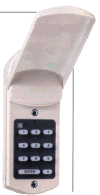
DOMINO GD1 KEYLESS ENTRY SYSTEM

Programming & Installation Instructions
The Domino will work with ALL electric garage door openers

Nature of Operation: The Domino GD1 Keyless Entry System is an electronic lock that can be used to activate any garage door opener. Pressing your personal code (1 - 6 digits) and the "enter key" allows you to open, stop, or close your motorized door in the same manner as your wall push button.

The Domino System consists of two parts: a permanently mounted keypad outside connected by 30cm long detachable telephone type cable to a control box located inside the garage. The control box powers the keypad with 3 "AA" Duracell batteries (included), and is connected to the garage door opener via a two core low voltage connecting "bell wire" (not included) to send an impulse signal to open, close, or stop the motor. (fig. 2)
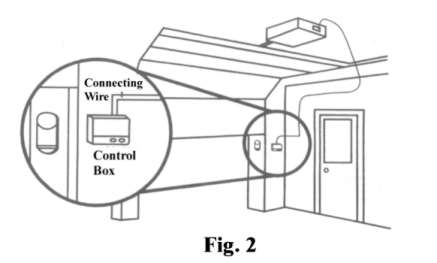
fig2.jpg (9616 bytes)

Installation

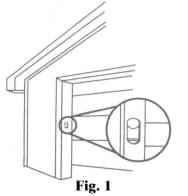
l. Outside keypad location: - the Domino keypad unit is weather resistant but it is advisable to choose a semi sheltered location away from driving rain. (see fig.1 below)
Drill a 1/2" hole from outside to into the garage. Carefully, feed the cable from keypad into the garage. Screw keypad to outside surface with 2 screws (included). Do not over tighten.

2. Inside: Snap keypad cable plug, with locking tab on bottom, into receptacle marked "KEYPAD" in Domino control box. Mount control box to wall with 2 screws (included).

3. Connection to motor: Disconnect power to garage door opener. Connect Domino control box to the push button terminals on the electric opener with low voltage bell wire. (fig. 2) screw wires into the two terminals marked "OPENER" in control box. Insert 3 "AA" batteries (included), observing polarity. Reconnect power to garage door opener.

OPTIONAL: If there is a  garage opener wall push-button located nearby you may connect the Domino control box to the terminals of this wall push button.

How to program your personal code:

Step 1. Slide switch to "on" or "program" (Switch is located on control box)
Step 2. Press ENTER... Press YOUR CODE (up to six digits)... Press ENTER again.
Step 3. Slide switch to "off’ or "operate"

How to Use Keypad: Press "YOUR CODE"... Press ENTER.

How to Erase old code: Simply set new code. The new code replaces old code.

If old code still seems to be working:

WAIT 20 seconds after you have entered your new correct code and pressed enter. Now try your old code. It will not work. There is a 20 second time period built into the keypad after the correct code has been pressed where any number (including your old code) and the ENTER button can activate the opener. This feature is useful when you need to quickly stop or reverse the door. Simply press the ENTER button.

How to Check Battery Life: (normal battery life is 3-5 years)

If either a) push button on control box activates door; or b) red indicator light on keypad lights up when pressing any number, then batteries do not need checking or replacing.

If ( a) and (b) do not work and you know batteries are good, make sure the batteries are firmly placed in the battery holder and they are oriented (+ -) correctly.


Safety and Convenience Features

Code Security. When operating and a wrong number is pressed, simply re-enter "your code" and press "ENTER". After 5 incorrect codes the Domino will not respond to any number during a 1 minute lockout security delay.

Night-time use. Pressing any key will cause the number lights to come on. The keypad will stay lighted for 20 seconds after the last digit is pressed.

Extra Push button. Also provided for convenient operation is an additional push button, located next to the program switch on the control box. You can use this button just as you would use any other wall push button, for example, when leaving on foot.

fig1.jpg (4257 bytes)

Common Questions, Comments, & Answers

When programming, it doesn’t accept the code and I notice the light blinking.

You can always restart the programming process at any time. If you have the switch in the "on" or "program" position and the light is blinking, simply press "ENTER", "your code", and "ENTER*’. The light will flash rapidly to indicate the code has been accepted. Then, slide program switch to "off" or "operate"

Can I remove the cover flap?

Yes, the hinged flap may be removed by gently prying out and lifting up slightly on one hinge.

Qty in stock:      price £ inc VAT   


Same day despatch on orders submitted by 2pm
Next-day delivery also available*
(*on orders placed Mon to Thurs only)

choose "next-day" delivery at the on-line checkout

Delivery Options

Royal Mail Special Delivery

•   Seip Electric Operators  •
•   Customers Feedback Comments   •
 •   Site Index   •    Home Page    •    Contact Us   •


Amourelle Products Limited

Inventors of the Securi-Dor automatic security locking device for motorised garage doors

Pay on-line by

PayPal express checkoutorMasterCard - Maestro - VISA - Switch etc.

It's NO Problem dealing with us!  -  We give old fashioned Customer Service at reasonable prices !


Making A Purchase
Making an on-line purchase could not be easier. Just browse our online shop, and click "add to basket" beside the items that you wish to buy and put them into the shopping cart. Click on "Continue Shopping" to add further items to your basket.  You can click on "View Shopping Basket" at any time to view or delete items you have within it. After you have finished your selection, click on "Order Checkout" and you will be asked for a few details that we need to be able to satisfy the order.  We accept Visa, Mastercard, Switch, Maestro, Solo, Electron or cheques in the post. We do not accept American Express. Your credit card will be debited prior to the despatch, 90% of orders are despatched the same day,  details of stock availability is shown beside the product.

Safe Secure On-Line Shopping
Our shopping cart system is operated on a dedicated e-commerce processing network and uses the highest level of security encryption for areas of our shopping process that handle your credit card details so you can be assured of 100% security when submitting your card details to our online payment facility >>
more

Telephone Orders
Regretfully we are unable to accept orders by telephone but if you'd rather not submit your card details on-line
click here

 Our Delivery Options - click for details

Problems with Cookies
Cookies are used on our shopping site to keep track of items you place in your shopping basket before you place your order.  Cookies are a fairly common occurrence in online shops.

If you are unable to access our shopping basket checkout page or a "cookie error message" is displayed when trying to place an order It is likely that your browser is set to block the use of "cookies"

In order to use our site you may need to change your browser security setting from 'Block all cookies', to 'Medium' which will allow common and usually harmless cookies to be used, whilst still maintaining good level of internet security.


How to adjust your cookie settings: (for Internet Explorer)
1) Open your browser
2) Go to Tools > Internet Options from the top bar
3) Go to privacy tab and move the bar down until 'Medium' is selected.
4) Click "apply" and close.

Amourelle Products Limited

The UK's #1 Garage Door Spares and Automation Specialists
©Copyright 2008 Amourelle Products Ltd  Reading, Berkshire. United Kingdom
Registered in England No. 1640847   -   VAT Reg. No. GB 642 0832 61

•  Trading Terms & Conditions  •

 
No part of this web site may be copied or reproduced without the written permission of Amourelle Products Ltd. Great care is taken to ensure that the information contained on this site is accurate, but APL cannot be held responsible for any error or miss-statement which may have occurred. 

All images and content are property of Amourelle Products Ltd
A licence to use an image may be purchased on-line - click for details

Page protected by Copyscape - do not copy


Additional Options

Our on-line shop is powered by  

RomanCart

This site is updated regularly and was last revised on 01/05/2008
To get the most from your visit we suggest that you view "full-screen"